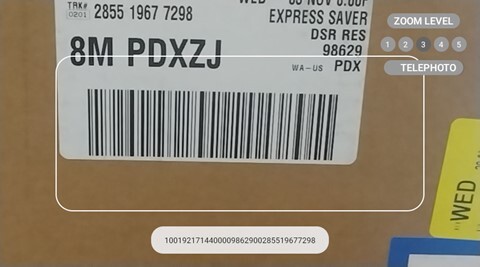
Say ‚BARCODE READER‚ or SELECT ITEM THREE to open the app.
The app can scan the following types of barcodes:
- Code 39
- Code 128
- Data matrix
- EAN 8
- EAN 13
- QR code
- UPC A
- UPC E
You can also scan QR codes that contain RealWear bookmarks, URLs, and application codes.
To scan a barcode, do the following:
- Point the camera at the barcode. Make sure the entire barcode is within the white rectangle on the display.
Note: Use the flashlight, zoom, and telephoto commands to better read barcodes, as required. - When the barcode is scanned successfully, a chime sounds, and the barcode details are shown at the bottom of the display.