Overview
If your Navigator 500 or 520 powers on, displays the RealWear logo, and immediately shuts down, but the battery has significant charge, the camera module is almost certainly the cause. The camera module must be fully connected to complete the device’s power circuit. An improperly seated module or debris in the connector will prevent the device from booting.
Procedure
- Power the device off completely.
- Remove the camera module.
Unlatch the module and pull it straight out. Do not twist or angle during removal.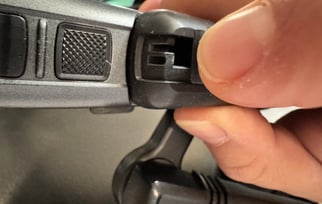
- Inspect the connector.
Check both the module and the device port for dust, lint, or debris. Use a short burst of compressed air to clear either connector if needed. Do not use liquids or metal tools.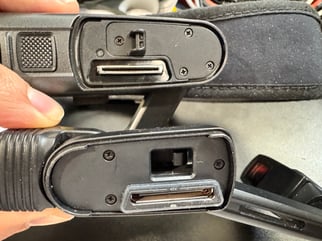
- Re-seat the module.
Align the module and press it firmly and evenly into the port until it sits flush with no visible gap. Apply firm pressure. A partially seated module is the most common cause of this issue.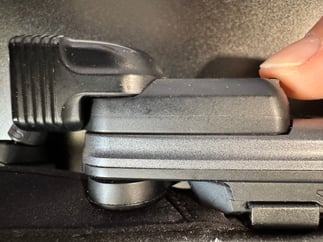
- Power on and Verify
If the device reaches the home screen, the camera module was the cause.
Still shutting down?
Try a known-good camera module. If the issue persists with a replacement module, contact Support@realwear.com or your designated Support Contact.
For images of the camera module and connector and instruction on disconnecting/connecting the module, see: Camera Module Replacement.
Revision date: April 14, 2026