Say "SHOW NOTIFICATIONS" to open the notifications panel over whatever you are doing. Say "HIDE NOTIFICATIONS" to close it again. Both work from any screen.
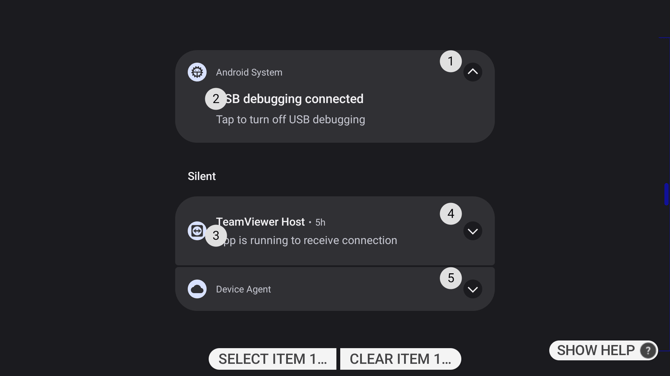
Each notification shows which app sent it, a headline and a short summary, and how long ago it arrived. Quiet notifications are grouped under Silent, below the rest.
Acting on a notification
Every part you can act on carries a number. Say "SELECT ITEM" followed by that number to open the notification, which shows it in full and offers whatever actions the app provides.
Some notifications have a number on an arrow at their right. Selecting that expands the notification in place rather than opening it.
Say "CLEAR ITEM" followed by a number to dismiss a notification without opening it.
Voice Commands
| Voice Command | Action |
|---|---|
| "SHOW NOTIFICATIONS" | Opens the notifications panel. |
| "HIDE NOTIFICATIONS" | Closes it. |
| "SELECT ITEM" followed by a number | Opens or expands the item carrying that number. |
| "CLEAR ITEM" followed by a number | Dismisses that notification. |
| "SHOW HELP" | Lists the commands available while the panel is open. |
Only one of "SHOW NOTIFICATIONS" and "HIDE NOTIFICATIONS" is active at a time, whichever matches what the panel is currently doing.