My Settings holds the settings you change day to day. Say "MY SETTINGS" from any screen to open it.
It was called My Controls before, and a device still running the previous operating system answers to that name instead.
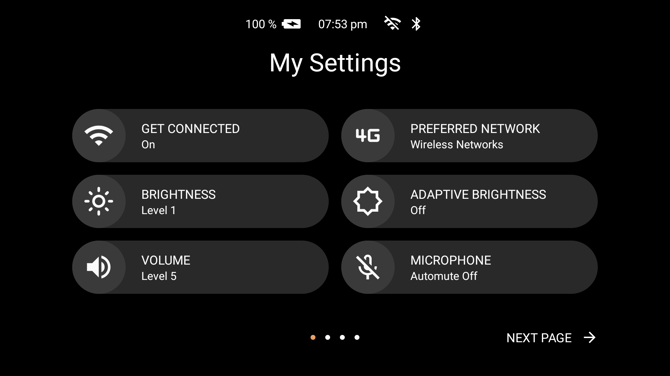
Settings are shown six to a page as tiles. Each tile carries its name and, under it, what it is currently set to. Say the name of a tile to open or change it.
Say "NEXT PAGE" and "PREVIOUS PAGE" to move between pages. The dots at the bottom show how many pages there are.
Two kinds of tile
Some tiles switch straight away. Saying "FLASHLIGHT" turns the light on, and saying it again turns it off.
Others open a screen of choices. Saying "POWER OPTIONS" or "ACTION BUTTON" gives you a set of options to pick from, and "NAVIGATE BACK" returns to the tiles.
What is on the tiles
| Tile | What it does |
|---|---|
| "ACCOUNT" | Shows the subscription the device is signed in to, and lets you sign in or out. |
| "WIRELESS NETWORK" | Chooses and connects to a wireless network. |
| "PREFERRED NETWORK" | Chooses between the networks the device can use. |
| "BRIGHTNESS" | Sets how bright the display is. |
| "ADAPTIVE BRIGHTNESS" | Lets the device set the brightness for you. |
| "VOLUME" | Sets the volume. |
| "MICROPHONE" | Turns automute on and off, which mutes the microphones when the device is not being worn. |
| "ARI" | Turns the Ari assistant on and off. |
| "ARI SPEECH TO TEXT" | Shows or hides what Ari hears and answers on screen. |
| "ARI TIMEOUT" | Sets how long Ari keeps listening before it closes. |
| "DISPLAY SIZE" | Sets how much of the display the picture fills. |
| "POWER OPTIONS" | Powers down, reboots, or puts the device to sleep. |
| "BLUETOOTH" | Turns Bluetooth on and off. |
| "FLASHLIGHT" | Turns the light on the device on and off. |
| "ACTION BUTTON" | Sets what a press of the Action Button does. |
| "WEARML INDICATORS" | Sets how long the numbers beside items stay on screen. |
| "NOISE CANCELLATION" | Sets how hard the device works to filter out background noise. |
| "DICTATION" | Chooses between dictation on the device and dictation in the cloud. |
| "HELP COMMAND" | Shows or hides the SHOW HELP prompt. |
| "FILE SHARING" | Allows or blocks file transfer over USB. |
| "MOUSE" | Turns the head-tracked pointer on and off. |
| "WEAR DETECTION" | Lets the device tell when it is being worn. |
| "TOUCHPAD" | Turns the touchpad on the device on and off. |
| "AUTO ROTATE" | Turns automatic screen rotation on and off. |
| "COLOR MODE" | Switches between the light and dark screen. |
| "ADVANCED SETTINGS" | Opens the full Android settings. |
Not every tile is on every device, because not every device has the hardware behind it. A device with a fixed display has no Auto Rotate; a device without a rear camera light has no Flashlight. The tiles can also be restricted for your organisation, so a managed device may show fewer.
Voice Commands
| Voice Command | Action |
|---|---|
| "MY SETTINGS" | Opens the settings from any screen. |
| The name of a tile | Opens or switches that setting. |
| "NEXT PAGE" / "PREVIOUS PAGE" | Moves between pages of tiles. |
| "NAVIGATE BACK" | Returns from a setting to the tiles, and from the tiles to where you were. |
| "SHOW HELP" | Lists the commands available on the current screen. |