My Files is where everything stored on your device lives: the photos and videos you capture, the documents put on the device for you, and anything you download.
Open it from Ari Home if it is one of your pinned apps. Otherwise say "MY PROGRAMS" and then "MY FILES". You can also say "HEY ARI, OPEN MY FILES".
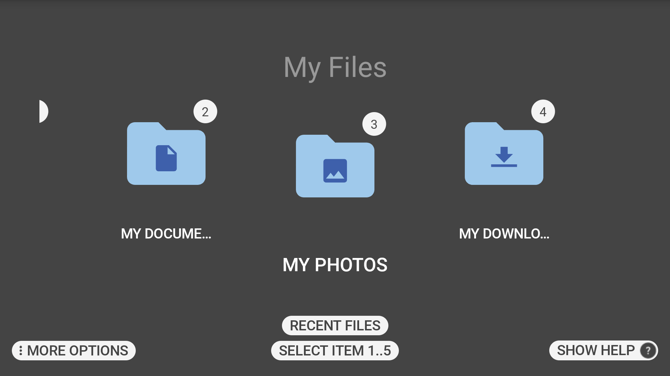
The folders
| Folder | What it holds |
|---|---|
| My Media | Videos and audio files. Videos you record with My Camera are in a Camera folder inside it. |
| My Documents | Documents put on the device. |
| My Photos | Still images. Photos you take with My Camera are in a Camera folder inside it. |
| My Downloads | Anything downloaded to the device. |
| My Drives | The storage attached to the device, including any drive you plug in. |
These five are what a device shows unless it has been set up differently for your organisation, in which case the folders can be named and arranged to suit the work.
Say the name of a folder to open it, or say "SELECT ITEM" followed by the number shown on it, for example "SELECT ITEM 1".
Moving around
The number on each item is what you say to open it. An item off the edge of the screen can still be opened by name or by number - the list does not have to be scrolled to it first.
Inside a folder, say "MY FILES" to go back to the top. If you have gone deeper than one folder, say "BACK ONE LEVEL" to go up a single step instead.
Say "RECENT FILES" from the top of My Files for a list of what you have opened recently.
Scan Bookmark
Say "MORE OPTIONS" at the top of My Files and then "SCAN BOOKMARK" to open the camera and scan a code.
A bookmark code names a file and where in it to go. If the file is already on the device it opens straight away, at the page or the point in the video the bookmark records. If it is not, the device offers to download it first. This allows a long manual to be opened at exactly the right page without searching for it.
Sorting
Inside a folder, say "MORE OPTIONS" and then "SORT FILES" to choose between "BY NAME" and "BY DATE".
Voice Commands
| Voice Command | Action |
|---|---|
| "BACK ONE LEVEL" | Goes up one folder. Available once you are more than one folder deep. |
| "MORE OPTIONS" | Opens the options for the screen you are on. |
| "MY FILES" | Returns to the top of My Files from anywhere inside it. |
| "MY MEDIA" | Opens the My Media folder. |
| "MY DOCUMENTS" | Opens the My Documents folder. |
| "MY PHOTOS" | Opens the My Photos folder. |
| "MY DOWNLOADS" | Opens the My Downloads folder. |
| "MY DRIVES" | Opens the My Drives folder. |
| "RECENT FILES" | Lists the files you have opened recently. |
| "SELECT ITEM" followed by a number | Opens the item carrying that number. |
| "SHOW HELP" | Lists the commands available on the current screen. |