My Camera takes photographs and videos, hands free.
Opening My Camera
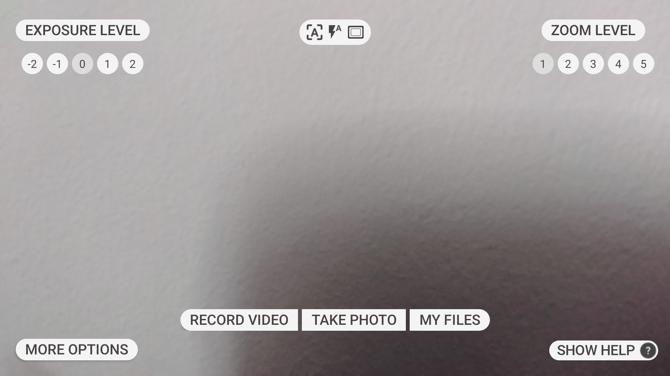
From Ari Home or from My Programs, say “MY CAMERA”. A live view of what the camera can see fills the display, with the controls arranged around it.
What is on the screen
| Position | Control | Shows |
|---|---|---|
| Top left | Exposure Level | -2 to 2, with the current level highlighted |
| Top right | Zoom Level | 1 to 5, with the current level highlighted |
| Top centre | Status icons | the focus mode, the flash mode and the aspect ratio in use |
| Bottom centre | Record Video, Take Photo, My Files | |
| Bottom left | More Options | |
| Bottom right | Show Help |
Say the name of any control to use it.
The controls
| Voice Command | Action |
|---|---|
| “TAKE PHOTO” | Captures a photo. |
| “RECORD VIDEO” | Starts recording. Say “STOP RECORDING” to finish. |
| “MY FILES” | Opens My Files, where photos and videos are kept. |
| “MORE OPTIONS” | Opens the camera settings. |
| “EXPOSURE LEVEL” followed by a number from -2 to 2 | Adjusts exposure. The view changes as soon as you say it. |
| “ZOOM LEVEL” followed by a number from 1 to 5 | Adjusts zoom. |
| “TELEPHOTO” | Zooms in a single step, more precisely than the zoom levels. |
| “PREVIEW” | Opens the photo or video you just captured. |
| “SHOW HELP” | Lists the focus and flash commands. |
When storage runs low
The screen shows roughly how many photos or how many minutes of video will still fit. When there is no room left it says so, and you will need to free some space before capturing anything else.