Ari Home is the screen your device starts on and the one you come back to. It holds the apps you use most and the way into everything else.
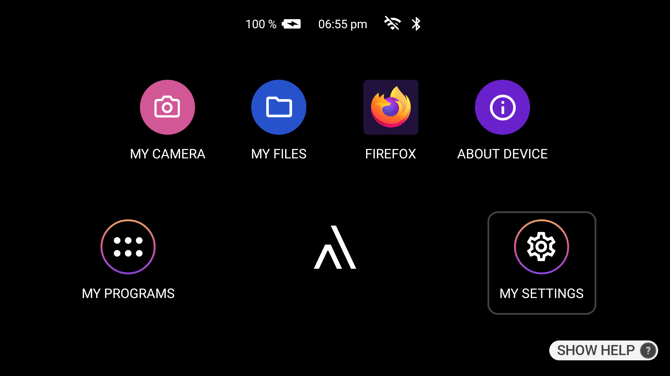
What is on the screen
Across the top is the status bar: the time, the battery level and whether it is charging, the Wi-Fi signal, and whether Bluetooth is connected.
In the middle are your pinned apps, up to five of them. Say the name shown under an app to open it.
Two controls sit at the bottom and are always there:
- My Programs, on the left, opens the full list of apps installed on the device.
- My Settings, on the right, opens the device settings.
In the centre, between them, is the Ari OS logo. On a device with the Ari assistant it becomes a rotating set of examples of things you can ask Ari, one every few seconds.
Which apps are pinned
The five pinned apps are set from Ari Business, so the ones on your device were chosen for the work you do. A device that has not had any pinned apps pushed to it shows Get Connected, My Camera and Collaborate.
Anything not pinned is still on the device. Say "MY PROGRAMS" and it will be in the list.
Returning to Ari Home
Say "NAVIGATE HOME" from anywhere, or press the Action Button, which does the same thing unless it has been set to do something else.
Kiosk mode and first-run setup
A device can be locked to a single app from Ari Business. On such a device that app opens instead of Ari Home, either every time you would return home or once after each restart, depending on how it was set up.
A device being set up for the first time does not start here either. It walks through choosing a language, connecting to Wi-Fi and a short training session, and reaches Ari Home once that is done.